Akii: SEO & AI Search Optimizer
Free SEO, AEO and GEO tools for Claude Code.
Developer ToolsOpen sourceOpen source · verified#seo#claude-code#open-source
Launches Oct 24, 2026 at 00:00 UTC
What is Akii: SEO & AI Search Optimizer?
Akii: SEO & AI Search Optimizer is a free, open-source plugin for developers, founders and SEO teams who use Claude Code. It adds SEO, answer engine optimization and generative engine optimization tools to your terminal or IDE workflow.
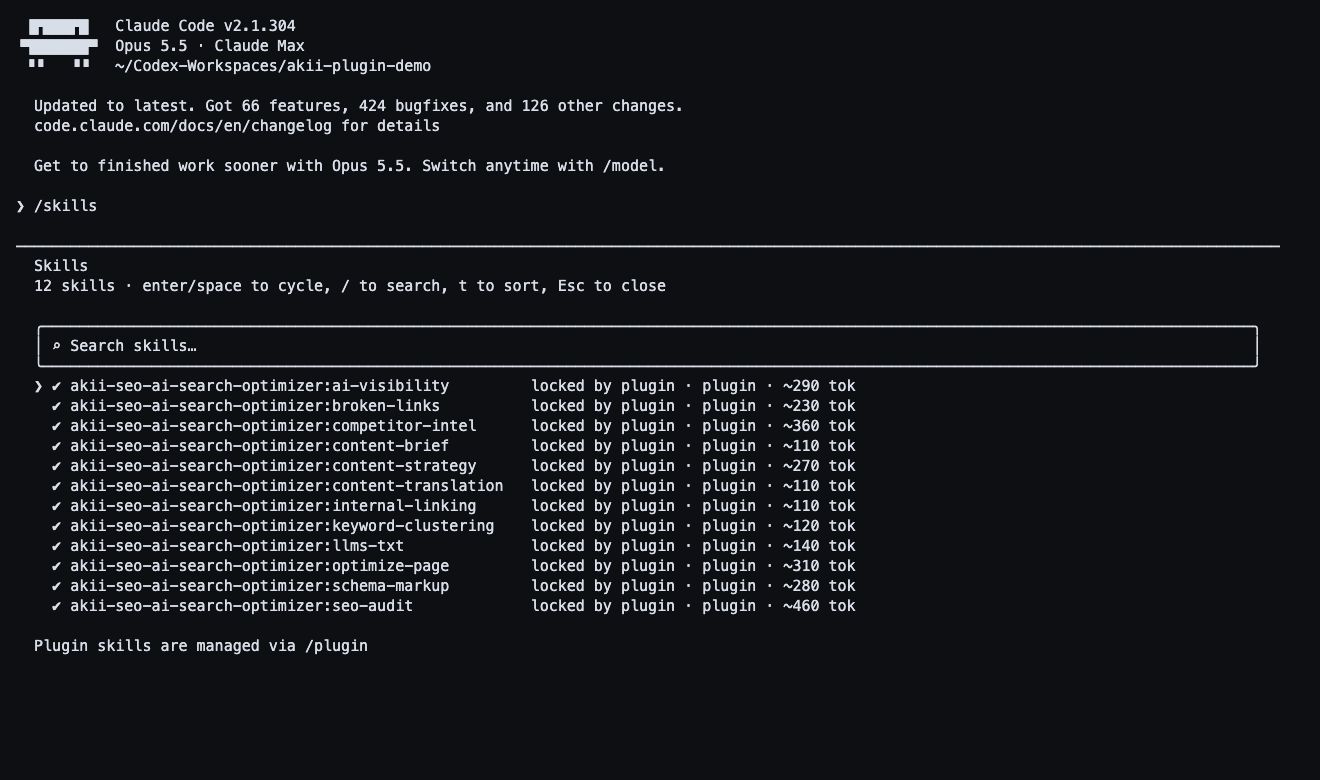
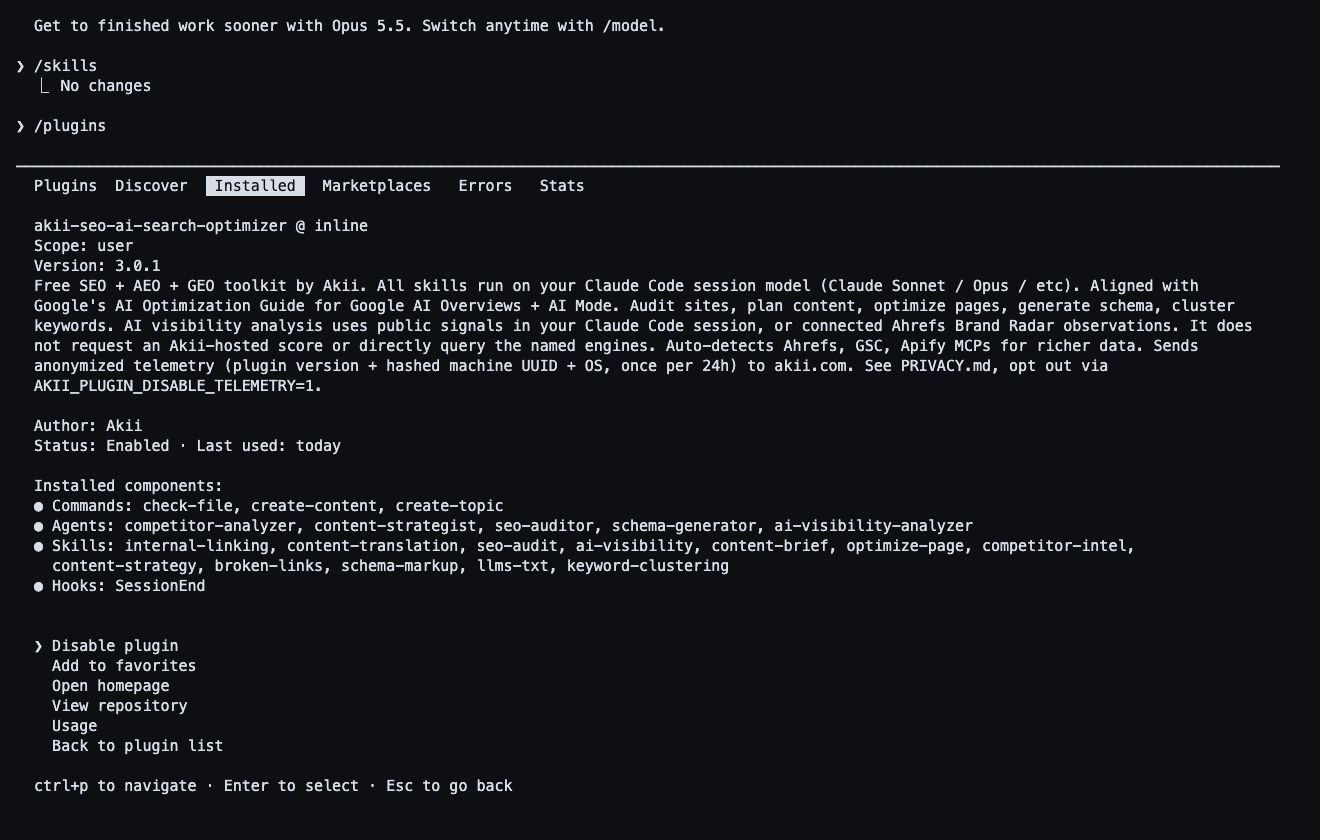
The plugin includes 12 skills, five agents and three commands. Audit websites, find broken links, improve internal links, compare competitors, plan content, group keywords and create JSON-LD schema. It can work with public URLs and local project files.
AI visibility analysis uses public web signals or data from a connected Ahrefs Brand Radar service. It does not directly query AI search engines or provide continuous hosted tracking. Ahrefs, Apify and PageSpeed Insights are optional data sources.
The plugin runs locally through Claude Code on macOS or Linux. Its MIT licence permits personal and commercial use. Akii charges no plugin subscription or usage fee, and no Akii account or payment card is required. Claude Code access, model usage and optional third-party services have separate access terms and costs.
Installation, documentation and updates are on GitHub: https://github.com/akii-technologies-ltd/akii-seo-ai-search-optimizer. Use GitHub Issues for bugs and Discussions for usage questions. Diagnostic telemetry is documented in the repository, including the opt-out AKII_PLUGIN_DISABLE_TELEMETRY=1.
MIT licence: https://github.com/akii-technologies-ltd/akii-seo-ai-search-optimizer/blob/main/LICENSE
Privacy: https://github.com/akii-technologies-ltd/akii-seo-ai-search-optimizer/blob/main/PRIVACY.md
Akii: SEO & AI Search Optimizer features
- Run 12 skills, five agents and three commands in an existing Claude Code terminal or IDE workflow.
- Audit public URLs or local files for technical SEO, page titles, metadata and content issues.
- Find broken links and review internal linking before preparing website fixes.
- Compare competitors, group keywords, plan content briefs and translate for local search.
- Create JSON-LD structured data and llms.txt files within Claude Code.
- Analyze public web or connected Ahrefs Brand Radar signals, with optional Ahrefs, Apify and PageSpeed Insights data.
Who uses Akii: SEO & AI Search Optimizer and for what
- Audit a website and inspect technical search issues in the Claude Code session used to edit it.
- Check broken and internal links across public URLs or local project files.
- Compare competitors, group keywords and prepare content briefs or translations.
- Create JSON-LD structured data and llms.txt files.
- Analyze AI visibility using public web signals or optional connected Ahrefs observations, with source limits stated.
Akii: SEO & AI Search Optimizer FAQ
What is Akii SEO & AI Search Optimizer?
It is a free, MIT-licensed Claude Code plugin for SEO, answer engine optimization and generative engine optimization. It includes 12 skills, five agents and three commands.
Where does the plugin run?
It runs locally through Claude Code on macOS or Linux, within an existing terminal or IDE session. It uses the model available in that Claude Code session.
What website work can it help with?
Audit public URLs and local files, check broken and internal links, compare competitors, prepare content briefs, group keywords, translate content, review titles and metadata, and create JSON-LD schema and llms.txt files.
Does it provide live AI search engine monitoring?
AI visibility analysis uses public web signals or connected Ahrefs Brand Radar observations. It explains its sources and limits. It does not directly query named AI engines or provide continuous hosted tracking.
Is the plugin free for commercial use?
Yes, under the MIT licence. No Akii account, payment card, plugin subscription or Akii usage charge is required. Claude Code access, model usage and optional third-party data services have separate terms and costs.
Where can I install it or get support?
Installation, documentation and updates are in the public GitHub repository. Use GitHub Issues for bugs and Discussions for usage questions. Repository privacy documentation explains diagnostic telemetry and the AKII_PLUGIN_DISABLE_TELEMETRY=1 opt-out.
Comments (0)
No comments yet. Ask the maker a question or share how you would use it.
More Developer Tools launches
Monitor Laravel scheduled tasks and queues

Feel iOS haptic patterns on a real iPhone, copy the code
Deploy anywhere from your AI tool.

Free product launch platform for indie makers
Back up your website as real static files
ShibaOpen source · verified
It asks before it writes code.