Apex Edge
Clear structure for every TradingView chart you trade
FinanceFreemium#technical-analysis#charting#education
Launches Jan 5, 2027 at 00:00 UTC
What is Apex Edge?
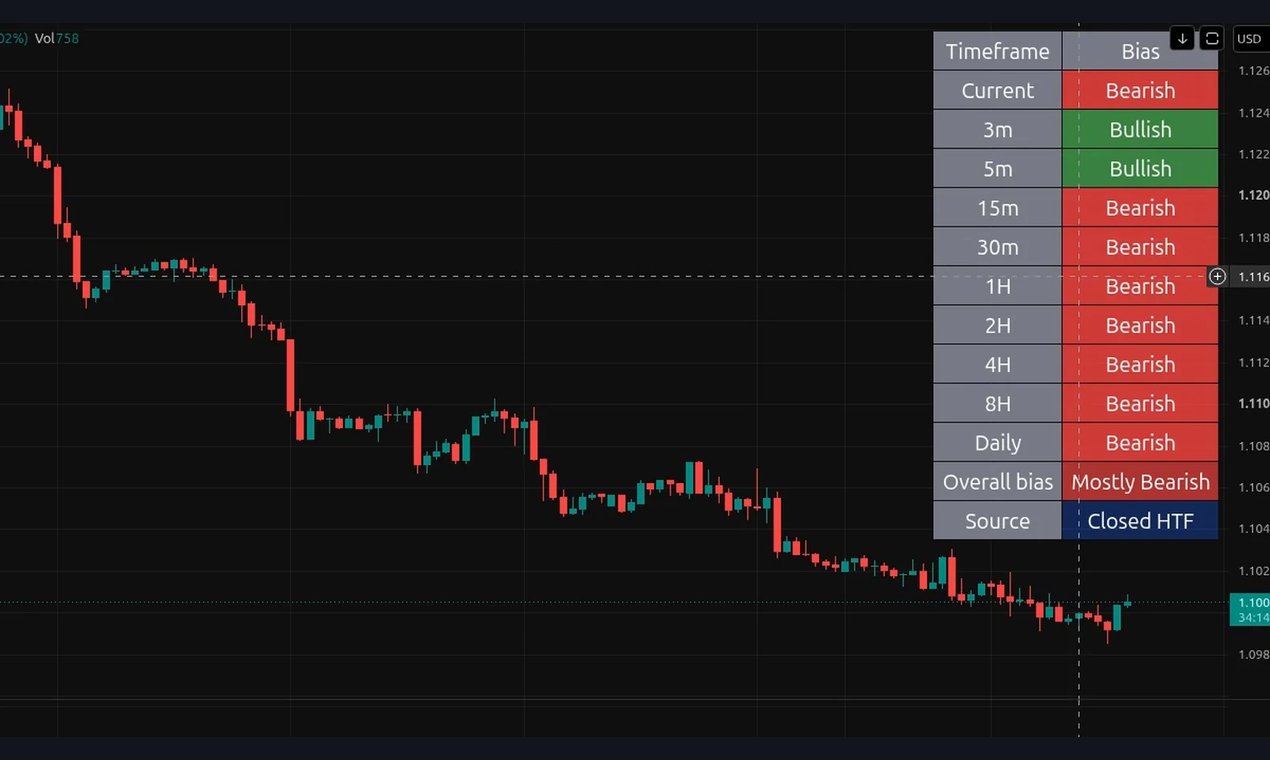
TradingView indicators and scanners from Brainio Software, plus a free Trend Check Dashboard for chart review. Education only. The best place to start is the free Trend Check Dashboard. Claim it free with your email; the setup instructions arrive by email. It is a compact table that sits on any market and any chart timeframe. It shows whether the current chart and nine other timeframes, from the 3-minute to the Daily, are bullish, bearish, or neutral, then summarizes the picture as Mostly Bullish, Mostly Bearish, or Mixed. Higher-timeframe rows read the last closed candle, so those rows do not flip while a candle is still forming. Position, size, and colors are adjustable. The free tool is the bias table only: it does not plot EMAs, mark pullbacks, grade setups, or include alerts.
The tools do not place orders and do not connect to a broker. Education only. Not financial advice. Trading involves risk of loss.
Apex Edge features
- Free Trend Check Dashboard: one table showing bullish, bearish or neutral bias on your chart and nine other timeframes.
- Apex Edge Trend Pullback: color-coded 20/50/200 EMAs, a multi-timeframe trend map and graded A+ and B+ setups.
- Apex Edge Zone Map — One support zone and one resistance zone, ATR-sized, with touch counts and compression control.
- Apex Edge Smart MACD: a familiar MACD pane plus a dashboard reading the last completed 4-hour ATR.
- Apex Edge Wave Map — Automatic five-wave impulse counts, A-B-C corrections, and Fibonacci retracements / projections.
- Apex Edge Intraday and Swing Scanners: Pine Screener tools that shortlist markets for chart review.
Who uses Apex Edge and for what
- Day traders use it to check whether the 3-minute to Daily timeframes agree before reviewing a chart.
- Swing traders use it to see higher-timeframe trend and nearby support and resistance zones on TradingView.
- Trading students use it to practice reading multi-timeframe bias and market structure as an education tool.
- Active traders use the Pine Screener scanners to shortlist markets for manual chart review.
Apex Edge FAQ
Is there a free plan?
Yes. The Trend Check Dashboard is free. Claim it free with your email and the setup instructions arrive by email.
What platform does it work on?
The indicators and scanners run on TradingView charts and in TradingView's Pine Screener.
Does it place trades or connect to my broker?
No. The tools are educational chart overlays and scanners. They don't place orders or connect to a broker.
Is this financial advice?
No. Apex Edge is education only. Trading involves risk of loss.
Do higher-timeframe readings change while a candle is forming?
Higher-timeframe rows read the last closed candle, so they don't flip while a candle is still forming.
Comments (0)
No comments yet. Ask the maker a question or share how you would use it.
More Finance launches
Crypto prices in your Mac’s notch (48h trial)
Non-custodial Solana exchange front end with Jupiter swaps

Free personal and family finance app
Compare SME business funding offers in one place
Wallets and rails that let AI agents spend money safely.
Offer Compare BoardOpen source · verified
Compare property costs, payment deadlines and unknowns