DisplaySwitcher
Switch monitor inputs and transfer files between computers
ProductivityPaid#monitor-switching#cross-platform#clipboard-share
Launches Jan 8, 2027 at 00:00 UTC

What is DisplaySwitcher?
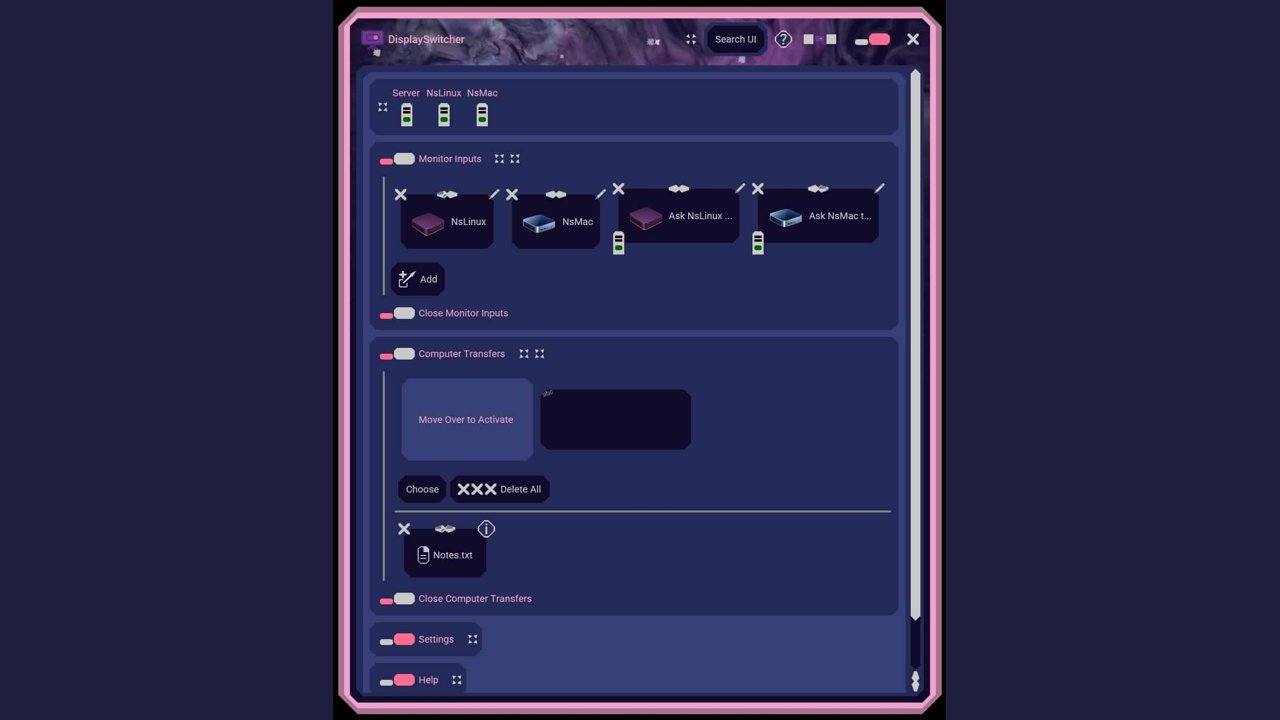
DisplaySwitcher is a desktop application for Linux, macOS, and Windows that combines monitor input switching with text and file transfers between up to three computers. Switch a monitor's video input with a software button instead of reaching for its physical controls.
Text and files are protected by encrypted connections and transferred only between computers signed in to your account, and the app automatically selects an available DisplaySwitcher server based on response time and capacity.
Paid subscription with a 1-month free trial: try it free for 1 month, no credit card required, and cancel anytime without contacting us.
Listed by FoundrList Team (agency) on behalf of Nebula Software.
DisplaySwitcher features
- Switch monitor inputs via software using DDC/CI
- Transfer text and files between computers
- Compatible with Linux, macOS, and Windows
- Encrypted connections for secure data transfer
- Automatic server selection for faster transfers
- Remote monitor switching from any connected device
Who uses DisplaySwitcher and for what
- Switch between multiple monitors without reaching for physical buttons
- Share clipboard content across different operating systems
- Transfer files quickly between a Mac, PC, and Linux machine
- Control a KVM-enabled monitor setup from a single keyboard and mouse
- Manage display inputs in a multi-computer workstation environment
DisplaySwitcher FAQ
Is DisplaySwitcher free?
DisplaySwitcher is a paid subscription with a one-month free trial. No credit card is required to start the trial, and you can cancel anytime.
Does DisplaySwitcher work on Mac?
Yes, the application runs on Linux, macOS, and Windows desktop computers.
Is DisplaySwitcher open source?
The website does not say. It is sold as a commercial subscription product by Nebula Software.
What is DisplaySwitcher used for?
It is used to switch a monitor's video input via software and transfer text and files between computers running different operating systems.
How does DisplaySwitcher switch monitors?
It sends DDC/CI commands through the video cable to compatible modern monitors, allowing software-based input switching instead of using physical buttons.
Comments (0)
No comments yet. Ask the maker a question or share how you would use it.
More Productivity launches
Infinite canvas OS for your apps, teammates and AI agents
Save every recipe. Plan every meal.
Fast, private voice dictation for Mac and Windows
Cloud HR platform for Saudi businesses
Looks like a calculator. Opens like a vault.
Free HEIC to JPG, PNG and PDF converter for iPhone photos